Starting your blogging journey doesn’t have to be expensive; in fact, Blogger is a completely free platform with no hosting fees or hidden costs, making it the perfect home for your new site. At Designer Blogs, we believe that “free” should still look high-end, which is why we offer a wide selection of affordable $15 templates to give your blog a polished, professional edge from day one.
Before you can dive into the fun part of styling and customizing, you’ll first need to get your platform ready. This tutorial will walk you through the simple, stress-free steps of creating your Blogger blog so you can start designing your dream site today!
How to Create a Blogger Blog in Under 5 Minutes
Setting up a blog doesn’t have to be a technical headache. In fact, the process is incredibly simple and can be completed in just a few clicks. Follow these five easy steps to get your site live and ready for one of our Blogger templates.
1. Visit Blogger
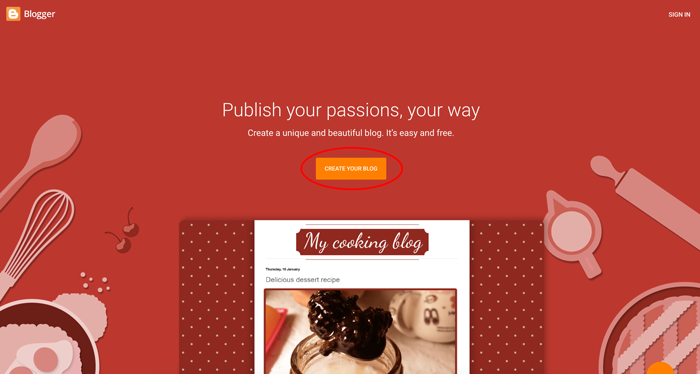
Head over to www.blogger.com and click the prominent button in the center that says CREATE YOUR BLOG.
2. Sign In or Create Your Google Account
Blogger is powered by Google, so you’ll need a Google account to get started.
- If you don’t have an account: Click the Create account link at the bottom left and follow the quick prompts to set one up.
- If you have Gmail: Simply sign in with your existing email and password.
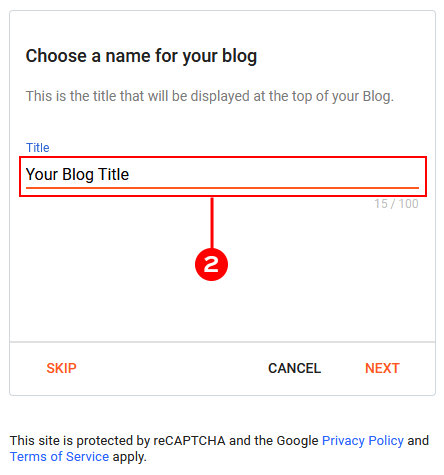
3. Choose a Catchy Blog Title
Type in the name you want for your blog. While you have a 100-character limit, we recommend keeping it short and sweet.
Design Tip: Most Blogger templates use this title for the header. A shorter title usually looks cleaner and more professional in your final design!
4. Claim Your Blog Address (URL)
This is the link people will use to find you (e.g., www.yourname.blogspot.com).
- Availability: If your first choice is taken, you’ll see a message saying, “Sorry, this blog address is not available.” Get creative until you see the “This blog address is available” confirmation.
- Custom Domains: Don’t worry if the
.blogspotpart bothers you! You can replace this with a custom domain (like .com) later. Contact us if you’d like help setting that up!

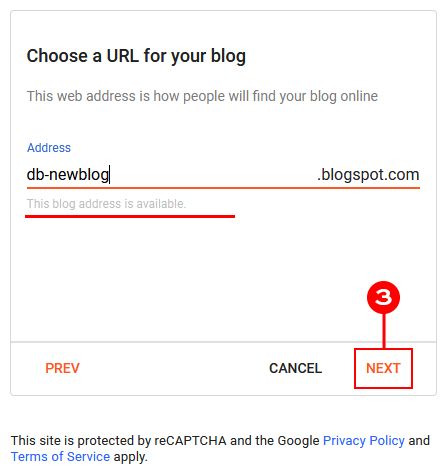
Once you’ve found the perfect address, click Next.
Important: You will be able to replace the address you create here with a custom domain! If you would like us to help you with that – contact us.
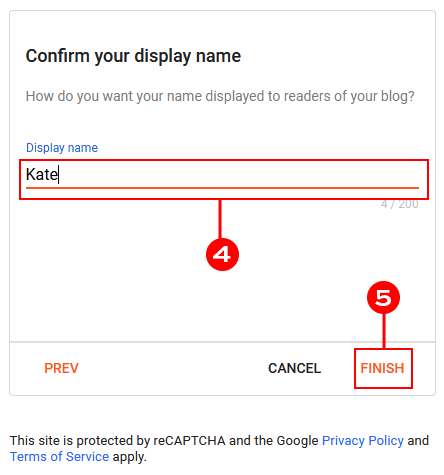
5. Confirm Your Display Name
Finally, enter the name you want readers to see when you publish a post. This could be your real name, a nickname, or your brand name. Again, simplicity is key here.
Your Blog is Ready!
Congratulations – you officially have a home on the web! Now comes the fun part: making it look beautiful. Ready to upgrade your look? Browse our $15 Blogger Templates to find a design that fits your style perfectly.
Your Blog is Live – What’s Next?
You can dive right in and create your first post. If you’re feeling a little “blank page” syndrome, don’t worry – check out our Short Guide to Creating Blogger Posts to learn how to use the editor like a pro.
Once your first post is drafted, you’ll likely want a design that matches your personality. A professional look doesn’t have to be expensive! We’ve designed a collection of easy-to-install, affordable $15 Blogger templates to help you stand out instantly.

Why Choose Blogger in 2026?
If you’re new to the blogging world, you’ve made a smart choice. Blogger remains one of the most reliable and user-friendly platforms available. Here’s why we love it:
- Zero Technical Stress: You don’t have to worry about security patches, server maintenance, or software updates. Google handles the “techy” stuff so you can focus on writing.
- Completely Free & Monetizable: Unlike other platforms that charge for “premium” features, Blogger gives you a stable, free home that is ready for Google AdSense from day one.
- Easy Customization: You don’t need to learn a single line of code. With our templates and Blogger’s straightforward interface, you can have a high-end look in minutes.
Ready to turn your hobby into a brand? Create your Blogger blog today and let your creativity run wild!



Leave a Reply